本文从我原先发布在 CSDN 的文章迁移而来,原文链接:https://blog.csdn.net/wang112031/article/details/102594415。
绘制折线图时,当绘图系数比较多,QCustomPlot 绘图的坐标轴正常四个轴可能就不够用,这里就需要更多轴,如下根据实例代码做了修改注释,做一记录备忘。效果图如下:
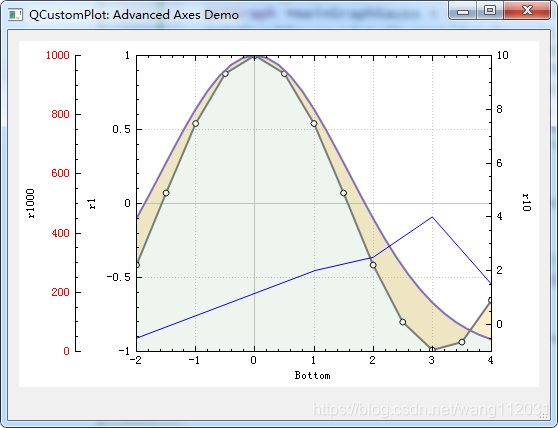
demoName = "Advanced Axes Demo";

// configure axis rect:
customPlot->plotLayout()->clear(); // clear default axis rect so we can start from scratch
QCPAxisRect *wideAxisRect = new QCPAxisRect(customPlot);
wideAxisRect->setupFullAxesBox(true); //创建四个轴,默认上轴,右轴刻度值不显示
wideAxisRect->axis(QCPAxis::atRight, 0)->setTickLabels(true); //右轴刻度值显示
//wideAxisRect->axis(QCPAxis::atLeft, 0)->setTickLabels(false);
wideAxisRect->addAxis(QCPAxis::atLeft)->setTickLabelColor(QColor("#FF0000")); // 在左侧添加一个额外的轴并为其刻度值上色
//wideAxisRect->addAxis(QCPAxis::atLeft)->setTickLabelColor(QColor("#6050F8"));
customPlot->plotLayout()->addElement(0, 0, wideAxisRect); // insert axis rect in first row
//customPlot->plotLayout()->setRowStretchFactor(1, 2);

// move newly created axes on "axes" layer and grids on "grid" layer:
foreach (QCPAxisRect *rect, customPlot->axisRects())
{
    foreach (QCPAxis *axis, rect->axes())
    {
        axis->setLayer("axes");
        axis->grid()->setLayer("grid");
    }
}

// prepare data:
QVector<QCPGraphData> dataCos(21), dataGauss(50), dataRandom(100);
QVector<double> x3, y3;
qsrand(3);
for (int i=0; i<dataCos.size(); ++i)
{
    dataCos[i].key = i/(double)(dataCos.size()-1)*10-5.0;
    dataCos[i].value = qCos(dataCos[i].key);
}
for (int i=0; i<dataGauss.size(); ++i)
{
    dataGauss[i].key = i/(double)dataGauss.size()*10-5.0;
    dataGauss[i].value = qExp(-dataGauss[i].key*dataGauss[i].key*0.2)*1000;
}
for (int i=0; i<dataRandom.size(); ++i)
{
    dataRandom[i].key = i/(double)dataRandom.size()*10;
    dataRandom[i].value = qrand()/(double)RAND_MAX-0.5+dataRandom[qMax(0, i-1)].value;
}
x3 << -2 << 1 << 2 << 3 << 4;
y3 << -0.5 << 2 << 2.5 << 4 << 1.5;

// create and configure plottables:
QCPGraph *mainGraphCos = customPlot->addGraph(wideAxisRect->axis(QCPAxis::atBottom), wideAxisRect->axis(QCPAxis::atLeft));
mainGraphCos->data()->set(dataCos);
mainGraphCos->valueAxis()->setRange(-1, 1);
mainGraphCos->valueAxis()->setLabel("r1");
mainGraphCos->rescaleKeyAxis();
mainGraphCos->setScatterStyle(QCPScatterStyle(QCPScatterStyle::ssCircle, QPen(Qt::black), QBrush(Qt::white), 6));
mainGraphCos->setPen(QPen(QColor(120, 120, 120), 2));
//mainGraphCos->valueAxis()->setOffset(0);
QCPGraph *mainGraphGauss = customPlot->addGraph(wideAxisRect->axis(QCPAxis::atBottom), wideAxisRect->axis(QCPAxis::atLeft, 1));
mainGraphGauss->data()->set(dataGauss);
mainGraphGauss->setPen(QPen(QColor("#8070B8"), 2));
mainGraphGauss->setBrush(QColor(110, 170, 110, 30));
mainGraphCos->setChannelFillGraph(mainGraphGauss);
mainGraphCos->setBrush(QColor(255, 161, 0, 50));
mainGraphGauss->valueAxis()->setRange(0, 1000);
mainGraphGauss->valueAxis()->setLabel("r1000");
mainGraphGauss->rescaleKeyAxis();

QCPGraph *Graph3 = customPlot->addGraph(wideAxisRect->axis(QCPAxis::atBottom), wideAxisRect->axis(QCPAxis::atRight));
Graph3->setData(x3, y3);
Graph3->valueAxis()->setRange(-1, 10);
Graph3->valueAxis()->setLabel("r10"); //LabelSide
Graph3->valueAxis()->setTickLabelSide (QCPAxis::lsOutside);//刻度值在方框外边显示
Graph3->rescaleKeyAxis();

wideAxisRect->axis(QCPAxis::atBottom)->setLabel("Bottom"); //设置下边轴的标题
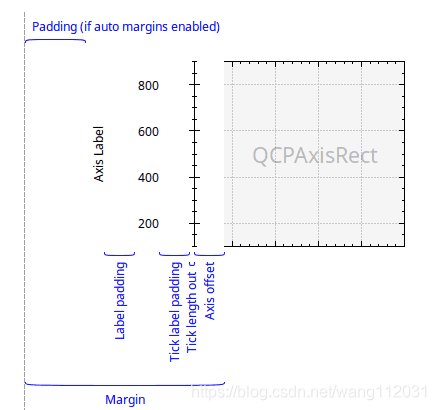
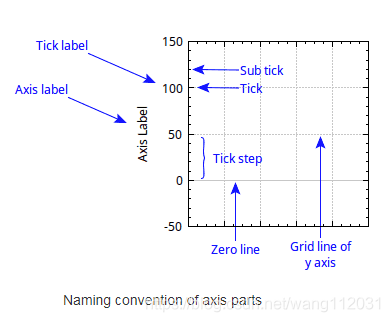
如下两个图,来自官方文档,对于坐标轴基本术语做了标识,设置时查找对应函数即可。
其实如果只是绘制多轴也没有必要清除默认的轴矩形,如下设置多轴即可
ui->plot->legend->setVisible(true); //显示图例
QFont legendFont = font();  // start out with MainWindow's font..
legendFont.setPointSize(9); // and make a bit smaller for legend
ui->plot->legend->setFont(legendFont);
ui->plot->legend->setBrush(QBrush(QColor(255,255,255,230)));
ui->plot->axisRect()->insetLayout()->setInsetAlignment(0,Qt::AlignTop|Qt::AlignLeft);
ui->plot->setBackground(QBrush(QColor(0,0,0,230)));

ui->plot->yAxis2->setVisible(true); //默认四个轴,上边轴和右边轴不显示 设置右边轴显示
ui->plot->axisRect()->addAxis(QCPAxis::atRight);
ui->plot->axisRect()->addAxis(QCPAxis::atLeft);
ui->plot->axisRect()->axis(QCPAxis::atLeft, 0)->setTickLabels(true);
回复 / 留言