本文从我原先发布在 CSDN 的文章迁移而来,原文链接:https://blog.csdn.net/wang112031/article/details/102555849。
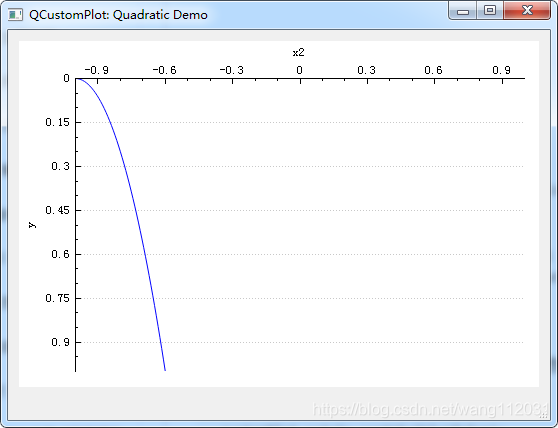
根据官方实例修改,主要实现如上效果,QCustomPlot 绘图的坐标轴正常有四个 :横轴下边(xAxis)默认显示,横轴上边(xAxis2),纵轴左边(yAxis)默认显示,纵轴右边边(yAxis2)。
demoName = "Quadratic Demo";
// generate some data:
QVector<double> x(101), y(101); // initialize with entries 0..100
for (int i=0; i<101; ++i)
{
    x[i] = i/50.0 - 1; // x goes from -1 to 1
    y[i] = x[i]*x[i];  // let's plot a quadratic function
}
// create graph and assign data to it:
customPlot->addGraph(); /*创建一个图表*/
customPlot->graph(0)->setData(x, y);  /*设置数据*/
// give the axes some labels:
customPlot->xAxis2->setLabel("x2");
customPlot->xAxis->setVisible(false);
customPlot->yAxis->setLabel("y");  /*设置坐标轴的名字*/
// set axes ranges, so we see all data:
customPlot->xAxis2->setRange(-1, 1);
customPlot->xAxis2->setVisible(true); /*设置是否显示*/
customPlot->yAxis->setRange(0, 1);   /*设置坐标轴的范围*/
customPlot->yAxis->setRangeReversed(true);/*刻度范围是否翻转,即刻度0变为最大值,最大值变为最小值*/
回复 / 留言